
Copilot inside Dynamics 365 used to be a simple assistant. It summarized meetings. It drafted emails. It surfaced relevant records. A human always started the interaction. A human always made the final call.
That framing has changed. Microsoft Copilot Studio now powers agents that plan multi-step actions. These agents execute tasks with limited human involvement. They escalate only when a defined condition is met. This is the platform behind custom agentic AI development across Dynamics 365 and the Power Platform.
Understanding what this platform actually does matters. It helps organizations plan realistic projects. It also helps avoid chasing vague automation promises.
What Copilot Studio Actually Is
Copilot Studio is a platform for building AI agents. It connects agents to your business data. It connects agents to your core systems. The platform evolved from Power Virtual Agents. Its scope has expanded considerably since then.
Organizations no longer need to script rigid conversation trees. Instead, Copilot Studio connects to knowledge sources. These include SharePoint, Dataverse, and Dynamics 365 records. The platform generates natural language responses grounded in that data. No one needs to anticipate every possible question in advance.
Agents can also call Power Automate flows. These flows execute real business processes. They create records. They send approvals. They update data across connected systems. This is what turns a chatbot into something that takes action. You can read Microsoft’s own overview of the platform on the official Copilot Studio page.
Four Types of Agents Worth Understanding

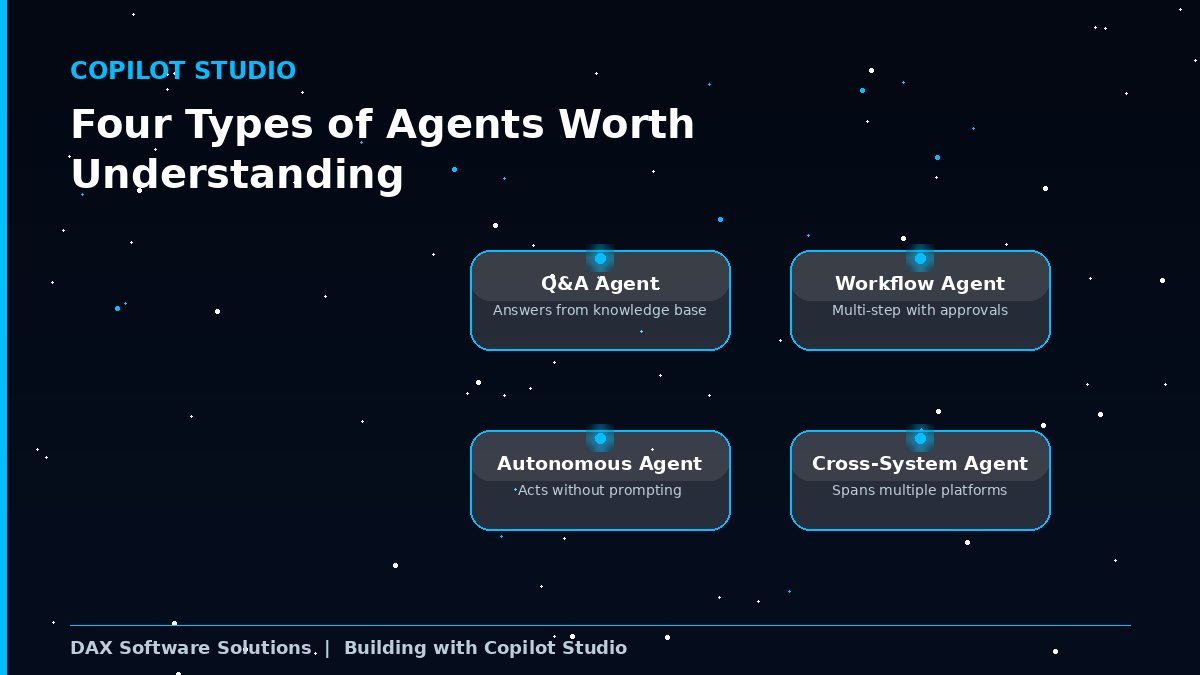
Copilot Studio generally supports four categories of agents. The distinction matters when planning a project.
Question and answer agents respond using a knowledge base. They do not take independent action. These are the fastest to deploy. They resemble the original chatbot model most closely.
Workflow agents execute multi-step processes. They include approval checkpoints along the way. A human still confirms key steps before completion.
Autonomous agents monitor events on their own. A new record might get created. A threshold might get crossed. The agent takes action without a human prompting each step. This is what most people mean by autonomous agents today. It also carries the biggest governance considerations.
Cross-system agents integrate data across multiple platforms. Dynamics 365 is one source among several. This lets an agent act on information spanning more than one application.
Most organizations skip straight to fully autonomous agents. That is usually a mistake. A better path starts small. Begin with a question and answer agent. Target one narrow, well-understood use case. Progress toward workflow and autonomous agents as confidence grows.
How This Connects to Pre-Built Dynamics 365 Agents
Microsoft has also released pre-built agents. These live directly inside specific Dynamics 365 applications. Sales gets agents for lead qualification and research. Customer Service gets agents for case triage and knowledge retrieval.
Pre-built agents need less configuration. They are also less flexible. They target a common, well-understood scenario. They are not built around your unique process.
A practical implementation often blends both approaches. Pre-built agents handle common scenarios out of the box. Custom agents built in Copilot Studio handle what is specific to your organization. This combination covers more ground than either approach alone.
Governance Is Built Into the Platform

More agents are moving into production every quarter. Microsoft has responded with centralized AI governance tools. Administrators can manage custom agents and pre-built agents together. This works through a shared control layer.
This includes shared security policies. It includes lifecycle management. It includes usage monitoring across every agent category. You no longer need a separate oversight process for each one. Microsoft outlines this shift in more detail in its Copilot Studio governance update.
This matters once you move past a single pilot agent. Managing five or ten agents separately becomes hard to sustain. Each one would need its own permission structure. Each one would need its own monitoring approach. A shared governance layer changes that math. It lets you scale agent adoption without a matching rise in administrative overhead.
Data loss prevention policies apply here too. They restrict which connectors an agent can use. Administrators can block risky external destinations. This reduces the risk of sensitive data leaking through automated agent actions.
Licensing Considerations Worth Planning For
Autonomous agent actions consume a metered resource. Microsoft calls this Copilot Credits. It sits separate from standard user licensing. Cost now scales with actual usage. It is no longer a flat, fixed cost per user.
Model your expected usage before committing to a tier. The cost structure differs from traditional per-user software. Most ERP budgeting processes were never built around metered AI consumption. Plan accordingly before you scale.
A Realistic Use Case Example
Picture an organization reducing manual effort in employee time entry. This runs inside Dynamics 365 Finance and Operations. Employees currently navigate a structured form for every entry.
A Copilot Studio agent can accept a natural language instruction instead. An employee requests hours logged against a named project. The agent translates that request into a structured time entry. It synchronizes directly with the underlying finance system.
This is a workflow agent, not a fully autonomous one. The employee still initiates every request. The agent removes the friction of manual form navigation. It also reduces data entry errors along the way. This represents an achievable first step. It works well before moving toward agents with zero human prompting.
Where Computer-Using Agents Fit In

A newer category addresses a persistent automation gap. Many systems still lack a usable API. Vendor portals fall into this category often. So do legacy applications never designed for automation.
Computer-using agents interact directly with these interfaces. They click. They type. They navigate screens like a person would. This extends automation into processes that previously required manual work. Microsoft describes these capabilities in its update on computer-using agents.
This matters for organizations running older systems alongside Dynamics 365. You do not need to wait for a full system replacement. You can automate around the gap instead.
Getting Started Without Overcommitting
You do not need a full agent strategy before building anything. A single, well-understood process is a better starting point. Pick something moderate in impact. A specific approval workflow works well. A repetitive data entry task works too.
Build one agent around it first. Set clear governance boundaries from day one. The lessons from that first project matter. They inform how you expand into additional use cases later. Microsoft’s own release roadmap for 2026 shows how fast this space is moving, detailed in the Copilot Studio release plan.
Where DAX Fits In
DAX Software Solutions evaluates where agentic AI fits inside your existing Dynamics 365 environment. We build custom Copilot Studio agents around specific business processes. We also design the governance structure needed to run them responsibly.
Explore our broader Dynamics 365 services to see how implementation, stabilization, and AI-enabled workflows connect. Read more perspectives like this one on the DAX blog.
Contact DAX Software Solutions to discuss building agentic AI into your Dynamics 365 environment. Visit daxsws.com/contact-us.